For independent landlords

Your AI assistant brings you only the decisions that need you.

Give tenants one number to text. The AI uses the unit’s lease, appliance manuals, and repair history to answer questions, ask for photos, and send you a recommended next step when it needs your approval.

See what a tenant text becomes.

Dishwasher

rental-assistant

Tenant text thread

Tenant: My dishwasher isn’t draining.
Assistant: I found the manual for your model. Want me to send the filter instructions?
Tenant: Yes please.
Assistant: Here’s the filter section from your manual. Let me know if that clears it up.Dishwasher manualPDF · Filter care
Tenant: That fixed it. It’s draining now!
Assistant: Glad it’s working. I’ve saved what fixed it.

Fixed by the tenant. Saved for next time.

The AI found the manual for the right model, shared the filter instructions, and checked that they worked.

Resolved without contacting the landlord

Unit B dishwasher · Filter cleared. The conversation and outcome are saved in the unit’s history for the next time it happens.

Slow drain

rental-assistant

Tenant text thread

Tenant: The shower is draining slowly again.
Assistant: I found the earlier service note. Could you send a quick photo of the drain cover from above?
Tenant: Here’s the photo. It still drains slowly.
Assistant: Thanks. I’ll include the photo and the earlier service note in the update for your landlord.

One useful photo, with the history attached.

A move-in note or prior repair can change what the assistant asks for next.

Text to the landlord

Unit B shower is draining slowly again. Today’s photo and the prior service note are attached. Ask your plumber to take a look?

Dining room bulb

rental-assistant

Tenant text thread

Tenant: The light bulb in the dining room is out.
Assistant: Your lease lists replacing light bulbs under minor upkeep. I can help find the right replacement. Could you send a photo of the bulb or its packaging if you have it handy?
Tenant: I have the box. I’ll send a photo.

A little help with routine upkeep.

The assistant checks the lease and offers to help the tenant find the right replacement.

Handled in the tenant thread

The assistant can suggest a compatible bulb or share an order link once it has the details.

AC service

rental-assistant

Tenant text thread

Tenant: Do you know when the AC was last serviced?
Assistant: The last recorded service was August 12. The technician noted a filter change and a drain-line cleaning.
Tenant: Thanks. I also noticed a dark patch near the vent.
Assistant: I’m letting your landlord know about the dark patch. If you already have a photo, please send it and I’ll add it to the report.

A quick answer from the service record.

Tenants can ask about their rental while you’re offline. The AI uses the recorded service history.

Text to the landlord

Unit B tenant reported a dark patch near the vent. The August 12 service note is attached. I’ll add a photo if the tenant sends one.

Tenant onboarding

Text the lease. Skip the data entry.

Send the signed lease PDF to your rental-assistant number. The AI pulls out the tenant details, sets up their records, and texts them a welcome message with the move-in checklist.

Landlord’s phone

9:41
rental-assistantText messages
Landlord sends a PDF attachment: Unit-B-signed-lease.pdf
Assistant: Jordan’s record is set up for Unit B. I sent the welcome text and move-in link.

Tenant’s phone

9:42
rental-assistantText messages
Assistant: Hi Jordan! Welcome to Unit B. You can text this number with questions or repairs.Open your move-in checklist
Tenant: Thanks! I’ll start on Saturday.

Move-in walkthrough

Start the rental’s history on day one.

The AI guides tenants room by room and asks for a photo when it would help. Photos, condition notes, and appliance details stay with the unit, ready for the next question or repair.
Example text thread
9:41
rental-assistantText messages
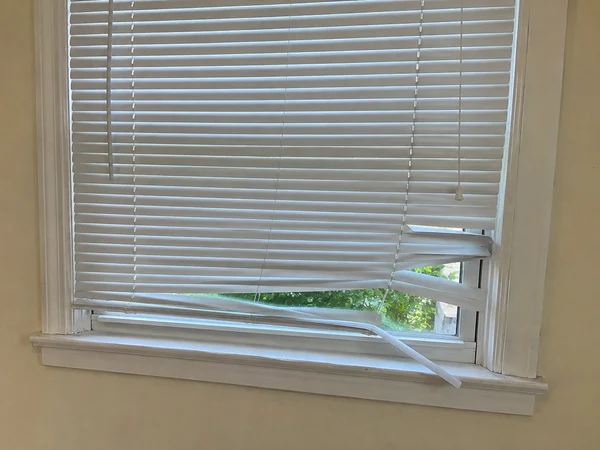
Assistant: Welcome to Unit B! How do the living room blinds look?
Tenant: A few slats are bent.
Assistant: Can you send a quick photo to confirm their condition?
Tenant: Here you go.Tenant photo of bent white window blinds in the living room
Assistant: Thanks. I saved the photo and note to your move-in record.
Saved to Unit B’s history

Move-in · Living room blinds

Tenant photo and condition note

Routine upkeep

A quick photo. A heads-up for the gardener.

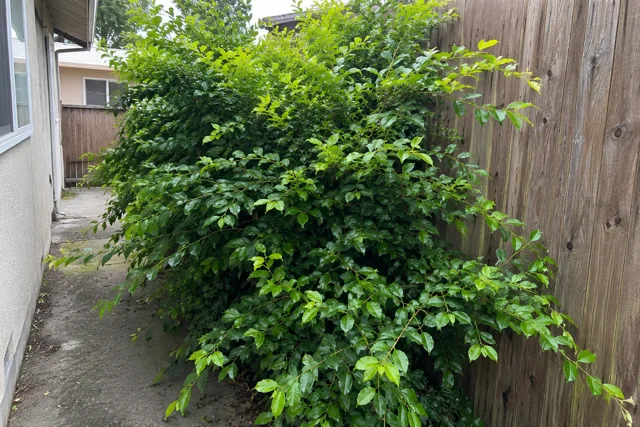
Your tenant texts a photo of the overgrown bush. If you’ve approved routine requests, the assistant forwards it to your gardener for their next visit and keeps track of the reply.
Tenant’s phone

10:14
rental-assistantText messages
Tenant: The bush in the backyard is overgrown.
Assistant: Can you send a quick photo?
Tenant: Here you go.Overgrown bush spilling onto the backyard path
Assistant: Thanks. I’ll ask your gardener to take a look on the next visit.

Gardener’s phone

10:16
rental-assistantText messages
Assistant: Next time you’re at 123 Maple Ave, could you take a look at the bush along the backyard path?Same backyard photo forwarded by the assistant
Gardener: No problem. I’ll take a look next time I’m there.

How it works

From move-in to the next repair.

Start at move-in

Text the lease to start onboarding. The assistant sends the walkthrough link and saves the tenant’s photos and notes.

Give the unit a history

Preserve move-in photos, the signed lease, manuals, and repair history so the next question starts with the right facts.

Approve by text

Get the problem, the evidence, and a proposed next step in one message. Reply when you’re ready to move the repair forward.

Walkthrough & pricing

Let’s talk about your rentals.

See how the AI assistant would handle move-in, tenant questions, and repairs for your properties. Get in touch for a walkthrough and pricing.